Short answer: llms.txt is a plain text file in Markdown that sits at the root of your site (yourshop.com/llms.txt) and gives a language model a short, curated map of your most useful pages. On WordPress, Yoast SEO can generate it with one switch. On Shopify there is no direct way to place a file at the root, so you upload it to Files and add a URL redirect from /llms.txt. One thing to know before you spend an afternoon on it: the OpenAI, Anthropic, Perplexity and Google crawler documentation we read on 15 October 2026 does not mention llms.txt, so treat it as a cheap, tidy extra and not a ranking lever.
What llms.txt is
The proposal was published by Jeremy Howard on 3 September 2024 at llmstxt.org. The idea is that a model, or a tool acting for one, has a limited amount it can read at once, and a clean list of your best pages saves it wading through navigation and scripts. The file lives at the root, is written in Markdown, and the specification says thousands of sites publish one.
It is a proposal, not a standard that search engines have said they use. We say that plainly because plenty of guides skip it.
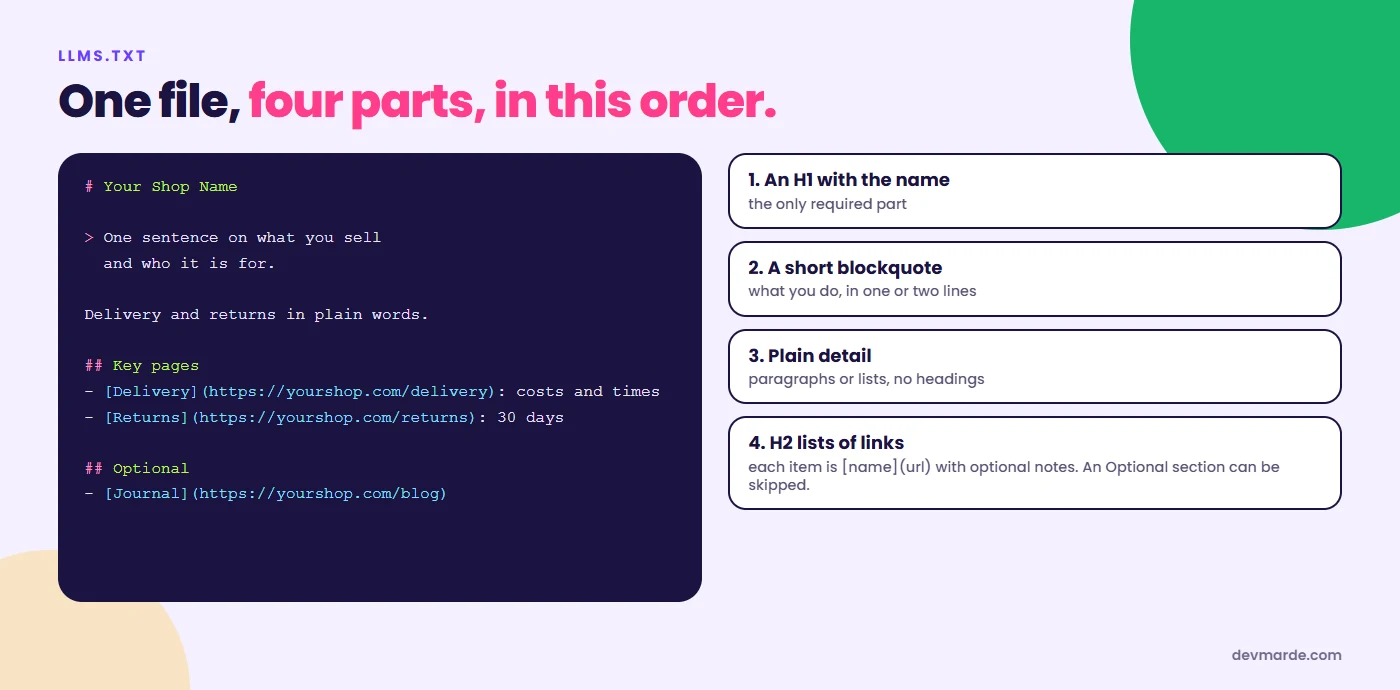
The format
- An H1 with the name of the site or shop. This is the only required part.
- A blockquote with a short summary of what you do.
- Detail in paragraphs or lists, with no headings.
- H2 sections containing lists of links, each written as
[name](url)with optional notes after a colon. A section called Optional marks links that can be skipped when a reader is short of space.
A template for a shop
# Your Shop Name

> One sentence on what you sell and who it is for.

We ship from [city] within two working days. Delivery and returns are explained in plain words on the pages below.

## Key pages

- [Delivery](https://yourshop.com/pages/delivery): costs and times by country
- [Returns](https://yourshop.com/pages/returns): 30 days, how to start one
- [Size guide](https://yourshop.com/pages/size-guide): measurements for every size

## Best sellers

- [Product name](https://yourshop.com/products/product-name): one line on what it is

## Optional

- [Journal](https://yourshop.com/blogs/news): articles and care guides
Fill it with the pages a customer actually asks about, not every URL. If you are not sure what to include, our free llms.txt generator builds a first draft from your answers.
Adding it on WordPress
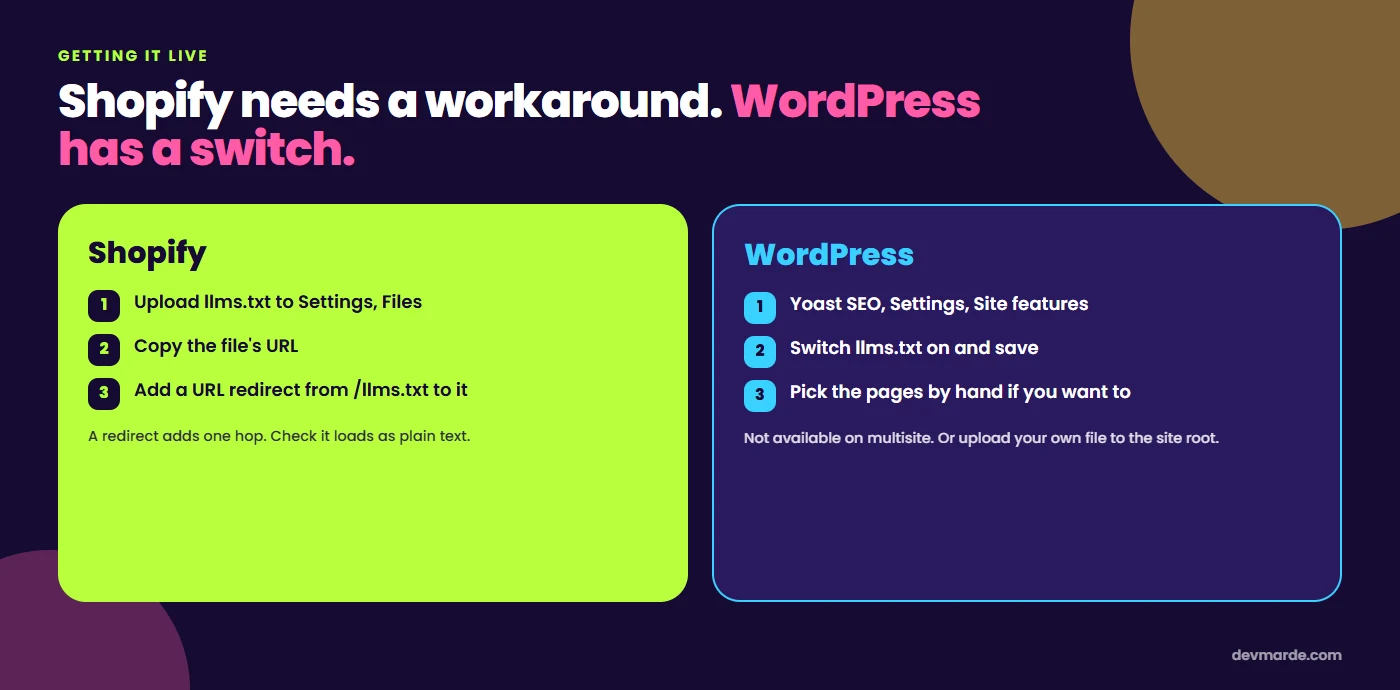
- Install and activate Yoast SEO (free or premium).
- Go to Settings > Site features and switch on the llms.txt feature, then save.
- Open yourdomain.com/llms.txt in a browser to check it.
By default Yoast lists your five most recently updated items and refreshes the file weekly, and you can choose pages by hand if you want to control the list. It is not available on multisite installs. If you do not use Yoast, you can upload your own plain text file named llms.txt to the folder where your site's robots.txt lives.
Adding it on Shopify
Shopify does not let you put an arbitrary file at the root of your store. The route that works for most shops, described in Shopify community and guide sources, is:
- Save your file as
llms.txton your computer. - In Shopify admin, go to Settings > Files and upload it. Copy the URL Shopify gives it.
- Go to Online Store > Navigation > URL redirects, create a redirect from
/llms.txtto the file's URL, and save. - Open yourshop.com/llms.txt and check that it loads as text.
That is a redirect, so there is one extra hop, and a tool that does not follow redirects will not see the file. Other routes are a Liquid template, an app, or a Cloudflare Worker, and we have not tested all of them. Whichever you choose, update the file when your key pages change, because an old llms.txt pointing at pages that no longer exist is worse than none.
Does it help?
We looked at the crawler documentation from OpenAI, Anthropic, Perplexity and Google on 15 October 2026 and none of them mentions llms.txt. That does not prove nobody reads it, and some tools and developers do. It does mean we would not promise any customer a result from it. The cost is an hour. The things that decide whether you are mentioned are still crawler access, clear pages, and what other sites say about you. Start with the AI crawler guide and the complete AI search optimization guide, then add llms.txt.
If you want a second pair of eyes on a Shopify or WordPress store, our AI visibility service includes it, and the free Crawl Audit check shows whether the file is found.
Questions people ask
What is llms.txt?
A proposed plain text file in Markdown, placed at the root of your website, that lists your most useful pages for language models. It was proposed by Jeremy Howard in September 2024.
Does ChatGPT use llms.txt?
OpenAI's crawler documentation that we read on 15 October 2026 does not mention it. Some tools and developers use the file, but we cannot point to OpenAI saying ChatGPT does.
Is llms.txt the same as robots.txt?
No. robots.txt tells crawlers what they may fetch. llms.txt is a curated reading list written for a model. One controls access, the other suggests where to start.
Can I add llms.txt to Shopify?
Yes, but not directly at the root. Upload the file in Settings, Files, then add a URL redirect from /llms.txt to the file's address.
How do I add llms.txt in WordPress?
With Yoast SEO, open Settings, then Site features, and switch the llms.txt feature on. Otherwise upload your own file to the site root.
How often should I update it?
When your key pages change. Yoast refreshes its version weekly. A hand-made file needs you to do it.
Sources
- llmstxt.org, The /llms.txt file, read 15 October 2026
- Yoast, llms.txt feature, read 15 October 2026
- Shopify Help Center, URL redirects, read 15 October 2026
- Crawler documentation from OpenAI, Perplexity and Google, read 15 October 2026
Related
View all →AI crawler user agents: what to allow, from GPTBot to ClaudeBot
Every AI crawler name you will see in your logs, what each one is for, which to allow if you want to be found in AI answers, copy-paste robots.txt rules, and the test we ran on our own site.
AI search optimisation for UK small businesses: where to start
A five-day plan for a UK small business to become readable to AI answers: let the search bots in, show your company details the way GOV.UK expects, mark up your business, and build proof on profiles you do not own.
How to tell if AI search optimization is working
Six free ways to measure AI search optimization, in the order to check them: Google and Bing AI reports, ChatGPT referrals, crawler logs and a prompt panel.
Find out whether AI answers can read your site.
Crawl Audit scores your own domain against the signals in this guide. The free check needs no sign-up; the full report is $7.89, one time.