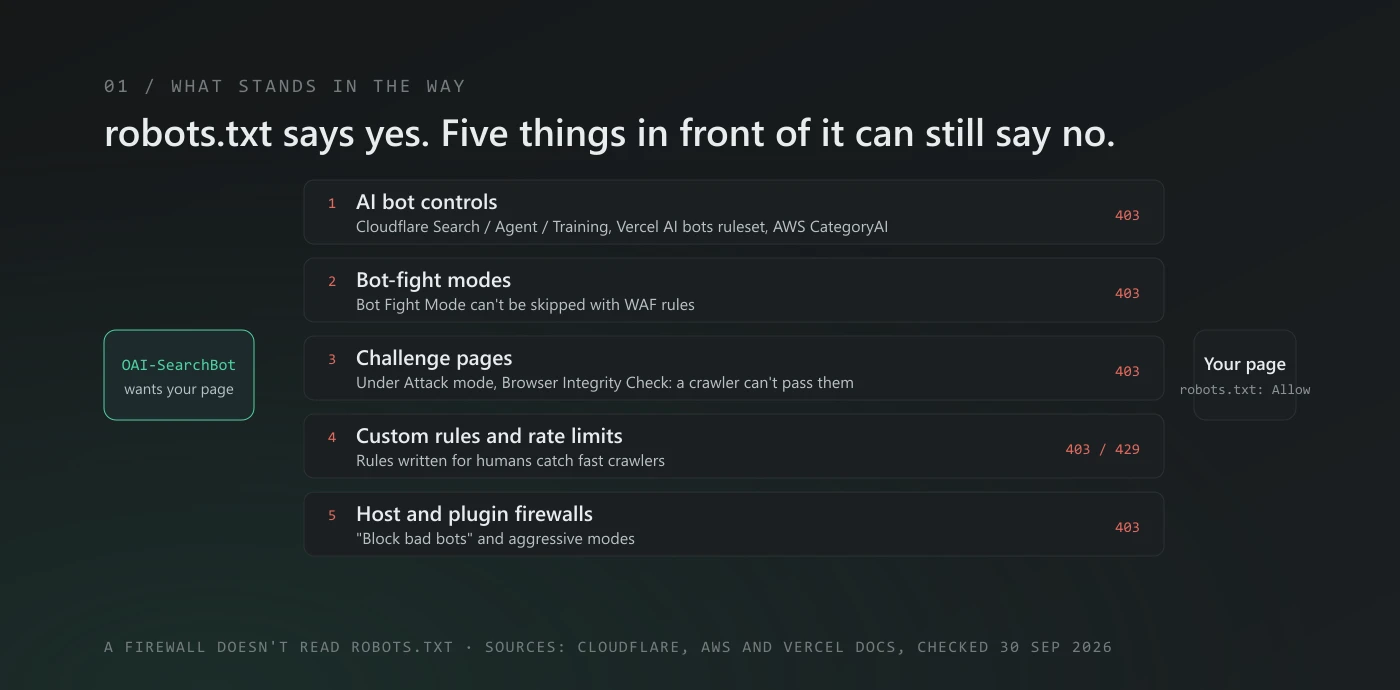
Short answer: your robots.txt can welcome every AI search bot while your firewall turns them away. On Cloudflare, the usual causes are the AI bot controls (especially "Block Training", which also blocks mixed-use crawlers such as Googlebot and Bingbot), Bot Fight Mode, challenge pages and custom WAF rules. Other firewalls have their own versions: AWS WAF's AI rule blocks AI bots even when they are verified. You can spot a block in two minutes with the steps below.
In our 60-second check, Test 2 is where most of these show up: robots.txt looks fine, but a fetch as the crawler comes back 403. This guide is what to do next.
Why robots.txt isn't the whole story
robots.txt is a note on the door. A CDN or firewall is a guard in front of it, and the guard decides first. Cloudflare's own documentation for its managed robots.txt feature says it plainly: "robots.txt compliance is voluntary." The same is true in reverse. A firewall doesn't read your robots.txt at all, so it can block a bot that robots.txt allows.
That matters because a lot of the web sits behind one of these guards. Cloudflare says more than 20% of web domains are behind it, and more than one million of its customers switched on its one-click AI crawler block after it launched in 2024.
Cloudflare: the settings that block AI bots
1. The AI bot controls (Search, Agent, Training)
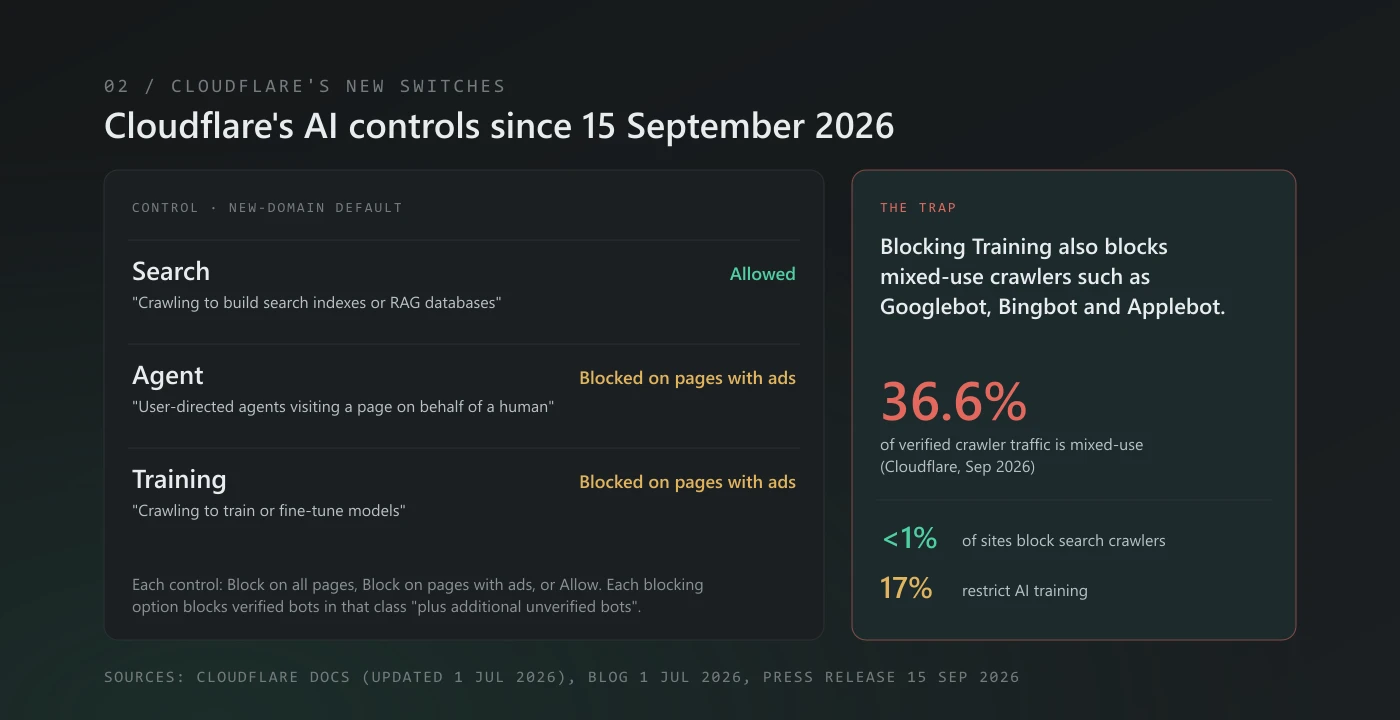
On 15 September 2026 Cloudflare replaced its single "Block AI bots" switch with three separate controls: Search, Agent and Training. Each one can be set to block on all pages, block only on pages that show ads, or allow. According to Cloudflare's documentation, each blocking option "will block Verified bots classified with that behavior, plus additional unverified bots."
For new domains, the default blocks Training and Agent bots on pages with ads and leaves Search allowed. Three things catch people out:
- Blocking Training also blocks mixed-use crawlers. Cloudflare says multi-purpose crawlers "such as Googlebot, Applebot, and BingBot will be blocked by customers who have selected to block Training". Mixed-use crawlers were 36.6% of verified crawler traffic in Cloudflare's September 2026 figures. Opting out of AI training this way can take you out of ordinary search too.
- Agent covers the user fetchers. Cloudflare defines Agent as "User-directed agents visiting a page on behalf of a human". That is exactly what
ChatGPT-UserandClaude-Userdo, so blocking Agent can stop ChatGPT and Claude opening a page when someone asks them to. - "Verified" is no longer "allowed". Cloudflare's July 2026 announcement says: "we are no longer viewing Verified as 'default allowed.'" A rule you wrote years ago that trusted verified bots may not behave the way it used to.
Cloudflare also reports that fewer than 1% of sites block search crawlers, while 17% restrict AI training. If you want to be found in ChatGPT, Claude and Perplexity search, set Search to Allow and think carefully before blocking Training on all pages.
2. Bot Fight Mode and Super Bot Fight Mode
Bot Fight Mode, on the free plan, sends suspected bots "computationally expensive challenges". Its documentation is blunt: "You cannot bypass or skip Bot Fight Mode using WAF custom rules or Page Rules." If it's challenging a bot you want, your options are to turn it off or to add an IP Access rule, which Cloudflare evaluates first.
Super Bot Fight Mode, on paid plans, can challenge or block bots too, but you can make exceptions: "create a custom rule with the Skip action."
3. Challenge pages and Browser Integrity Check
A crawler can't solve a "checking your browser" page. Under Attack mode requires the visitor's browser "to support JavaScript to display and pass the interstitial page", and Cloudflare says of challenge pages: "The visitor cannot reach their destination without passing the challenge." Browser Integrity Check, which is "enabled by default", challenges visitors "with a non-standard user agent such as commonly used by abusive bots, crawlers, or visitors."
4. Rules you (or someone before you) added
Custom WAF rules, rate limits and country blocks are the quiet ones. A rule that challenges "anything that isn't a browser", or a rate limit tuned for human visitors, will catch a crawler that fetches pages quickly. Check the rules list, not just the headline settings.
A note on Perplexity
In August 2025 Cloudflare said of Perplexity: "we have de-listed them as a verified bot and added heuristics to our managed rules that block this stealth crawling." So on Cloudflare, an exception that only lets verified bots through won't cover PerplexityBot. If you want Perplexity's search, you'll need a rule that names it, checked against Perplexity's published IP list.
Other firewalls
- AWS WAF Bot Control. Most of its categories leave verified bots alone ("The rule group doesn't block these verified bots"). The exception is its AI rule:
CategoryAI"applies the action to all matches, regardless of whether the bots are verified or unverified", and the action is Block. If you run Bot Control,OAI-SearchBotand friends are blocked unless you override that rule. - Vercel Firewall. Its AI bots managed ruleset covers bots that crawl "for training data, search purposes, or user-generated fetches", and it is "inactive by default". Its bot protection ruleset "automatically excludes verified bots", and Vercel's verified directory includes
oai-searchbot,claude-searchbotandperplexitybot. The risk here is someone switching the AI ruleset to Deny without realising it includes search bots. - WordPress security plugins and host firewalls. Many have "block bad bots", rate-limit or "aggressive" modes. Settings differ by plugin and version, so check yours rather than trusting a default.
A firewall block is one item in a crawl audit. The checklist covers the rest, from robots.txt to crawl budget.
How to tell if it's happening to you
From a terminal (one minute). Ask for your page with a crawler's name and look at the response headers, not just the page:
curl -s -o /dev/null -D - -A "Mozilla/5.0 (compatible; OAI-SearchBot/1.0; +https://openai.com/searchbot)" https://yourdomain.com/ | grep -iE "^(HTTP|cf-mitigated|server)"A 200 is good. A 403 with cf-mitigated: challenge means Cloudflare served a challenge page: its documentation says every challenge response "will have the cf-mitigated header present and set to challenge". Here's what that looks like. On 30 September 2026 we sent this request to Cloudflare's own radar.cloudflare.com, first calling ourselves GPTBot and then Chrome:
HTTP/1.1 403 Forbidden
Cf-Mitigated: challenge
Server: cloudflare
Both got the same answer, because neither request came from a real browser. That's the honest limit of this test: it sends the bot's name, not the bot's network address. A firewall that verifies real crawlers by IP may block your test and still let the real OAI-SearchBot through, or the other way round. Treat a 403 as "go and look", then confirm with the next two checks.
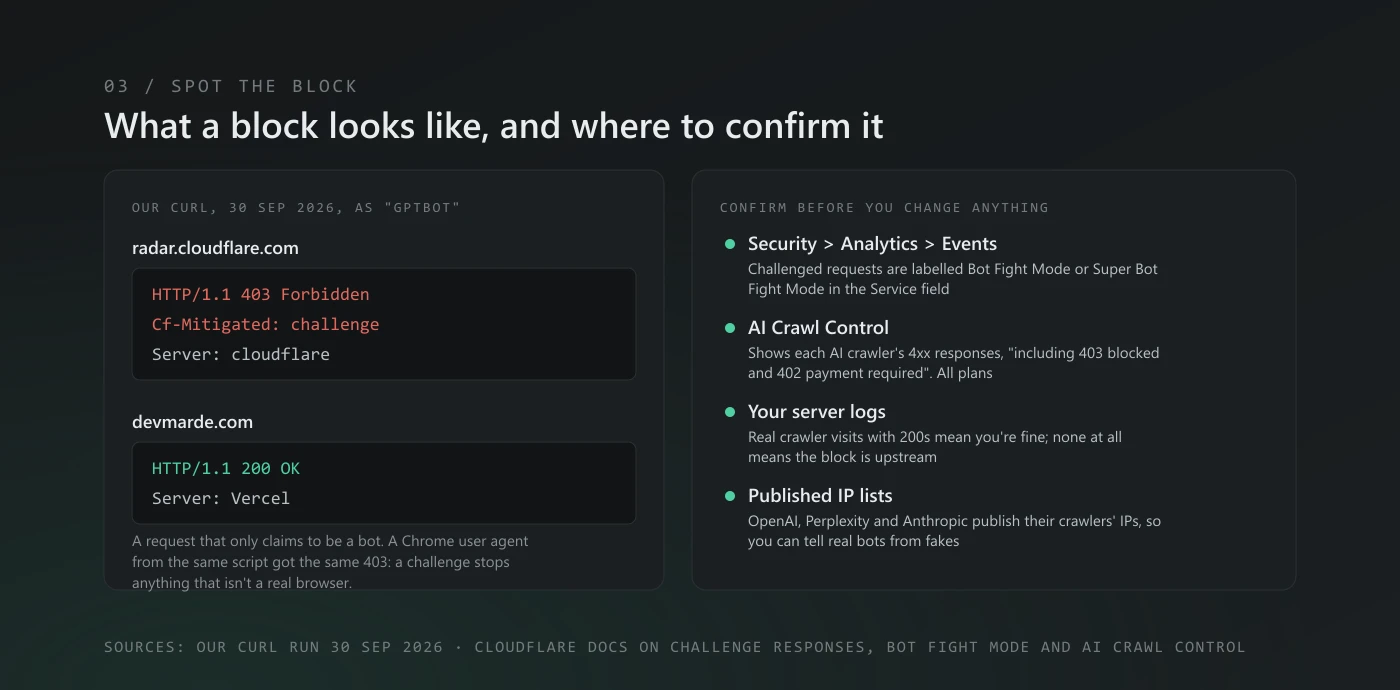
In the Cloudflare dashboard. Go to Security > Analytics and open the Events tab. Requests challenged by Bot Fight Mode are "labeled Bot Fight Mode in the Service field", and the same goes for Super Bot Fight Mode. AI Crawl Control, which is available on all plans, shows each AI crawler's responses, including a 4xx column for "403 blocked and 402 payment required". One caveat from Cloudflare: rules that run before AI Crawl Control "may not be visible in AI Crawl Control analytics", so check Security Events too.
In your server logs. If a real crawler's requests reach you with 200s, you're fine. If they stop reaching you at all, the block is upstream. To check that a visitor calling itself OAI-SearchBot really is one, compare its IP with the company's published list: OpenAI publishes searchbot.json and chatgpt-user.json, Perplexity publishes perplexitybot.json, and Anthropic publishes one list for its bots.
If you'd rather not open a terminal, the free Crawler Tester fetches your page as GPTBot, ClaudeBot, PerplexityBot and Google-Extended and shows the status code for each. It has the same limit as curl: it sends the bot's name from our server, not from the bot's network.
How to fix it
- Decide what you want first. Most businesses want the search bots (
OAI-SearchBot,Claude-SearchBot,PerplexityBot) in, and treat training as a separate business decision. - Cloudflare AI controls: set Search to Allow. If you block Training, remember it also blocks mixed-use crawlers like Googlebot and Bingbot; "Block on pages with ads" is the narrower choice. You can also allow a single crawler in AI Crawl Control: "From the Actions column, select Allow."
- Super Bot Fight Mode: add a custom rule with the Skip action for the crawlers you want. The field
cf.client.bot"Indicates whether the request originated from a known good bot or crawler." Remember Perplexity isn't in that list on Cloudflare. - Bot Fight Mode: it can't be skipped with WAF rules. Turn it off, or use IP Access rules for the published crawler IPs.
- AWS WAF: override the
CategoryAIrule, for example to Count, and write your own rule for the AI bots you want to block. - Test again with curl and the Crawler Tester, then watch your logs for real crawler visits over the next few weeks.
Letting the search bots in is step one of AI search optimization. If your firewall settings are someone else's job, our AI visibility service can take the check and the fix off your hands.
What we can't tell you yet
We'd like to tell you what share of sites block AI search bots by accident. We don't have that number from our own checks yet, and we won't guess. When we've run the free check on enough real sites to say something honest, we'll publish the count and the method.
Questions people ask
Does Cloudflare block ChatGPT by default?
Not ChatGPT search. For new domains since 15 September 2026, Cloudflare's defaults block Training and Agent bots on pages with ads and allow Search. OAI-SearchBot builds a search index, which is Cloudflare's Search category. ChatGPT-User opens pages when someone asks ChatGPT to, which matches Cloudflare's Agent category, so on pages with ads it may be blocked by default. Existing zones may be on different settings, so check your dashboard.
My robots.txt allows GPTBot. Why do I see 403s?
Because your firewall doesn't read robots.txt. A 403 comes from something in front of your site: a bot setting, a challenge, a WAF rule or a rate limit. The response headers and your firewall's event log tell you which.
Why does ChatGPT get a Cloudflare challenge page or a 403 on my site?
Because something in Cloudflare decided the request might be a bot and asked it to prove otherwise, and a crawler can't pass a challenge page. Check the response headers: a 403 with cf-mitigated: challenge is Cloudflare's challenge. The usual causes are the Agent control (it covers ChatGPT-User, which opens a page when someone asks ChatGPT to), Bot Fight Mode, Browser Integrity Check, Under Attack mode or a custom WAF rule. Find the one that fired in Security > Analytics > Events, then fix it with the steps above.
If I block AI training on Cloudflare, will I lose Google?
You can. Cloudflare says customers who block Training also block multi-purpose crawlers such as Googlebot, Applebot and Bingbot. If you want to opt out of AI training without touching search, use the narrower options, or robots.txt groups for the training bots, such as GPTBot, ClaudeBot and Google-Extended.
Is blocking AI bots in the firewall ever right?
Yes, for training bots you don't want, or crawlers that ignore your rules. The mistake isn't blocking; it's blocking the search bots along with them without meaning to.
Sources
- Cloudflare, Block AI bots (updated 1 July 2026), checked 30 September 2026.
- Cloudflare, press release, 15 September 2026.
- Cloudflare blog, Content Independence Day, 1 July 2026.
- Cloudflare, press release, 1 July 2025.
- Cloudflare docs: Bot Fight Mode, Super Bot Fight Mode, Browser Integrity Check, detecting a challenge response, AI Crawl Control, cf.client.bot, checked 30 September 2026.
- Cloudflare blog, Perplexity and undeclared crawlers, 4 August 2025.
- AWS, AWS WAF Bot Control rule group, checked 30 September 2026.
- Vercel, Bot Management (updated 10 September 2026), checked 30 September 2026.
- OpenAI, Perplexity and Anthropic crawler IP lists, linked above, checked 30 September 2026.
Zain Kazmi runs DevMarDe, a development, marketing and design studio. We build the free AI visibility tools on this site and use them on our own pages first.
Related
View all →Can ChatGPT read my website? Check it in 60 seconds
Four quick tests show whether ChatGPT, Claude and Perplexity can fetch and read your site: robots.txt, a crawler fetch, the raw HTML and your server logs. Free, no sign-up.
How to tell if AI search optimization is working
Six free ways to measure AI search optimization, in the order to check them: Google and Bing AI reports, ChatGPT referrals, crawler logs and a prompt panel.
Crawl audit checklist, including the AI crawlers
A crawl audit checks that bots can reach, fetch and read every page that matters. The checklist, our own numbers, and the AI-crawler half most audits skip.
Find out whether AI answers can read your site.
Crawl Audit scores your own domain against the signals in this guide. The free check needs no sign-up; the full report is $7.89, one time.