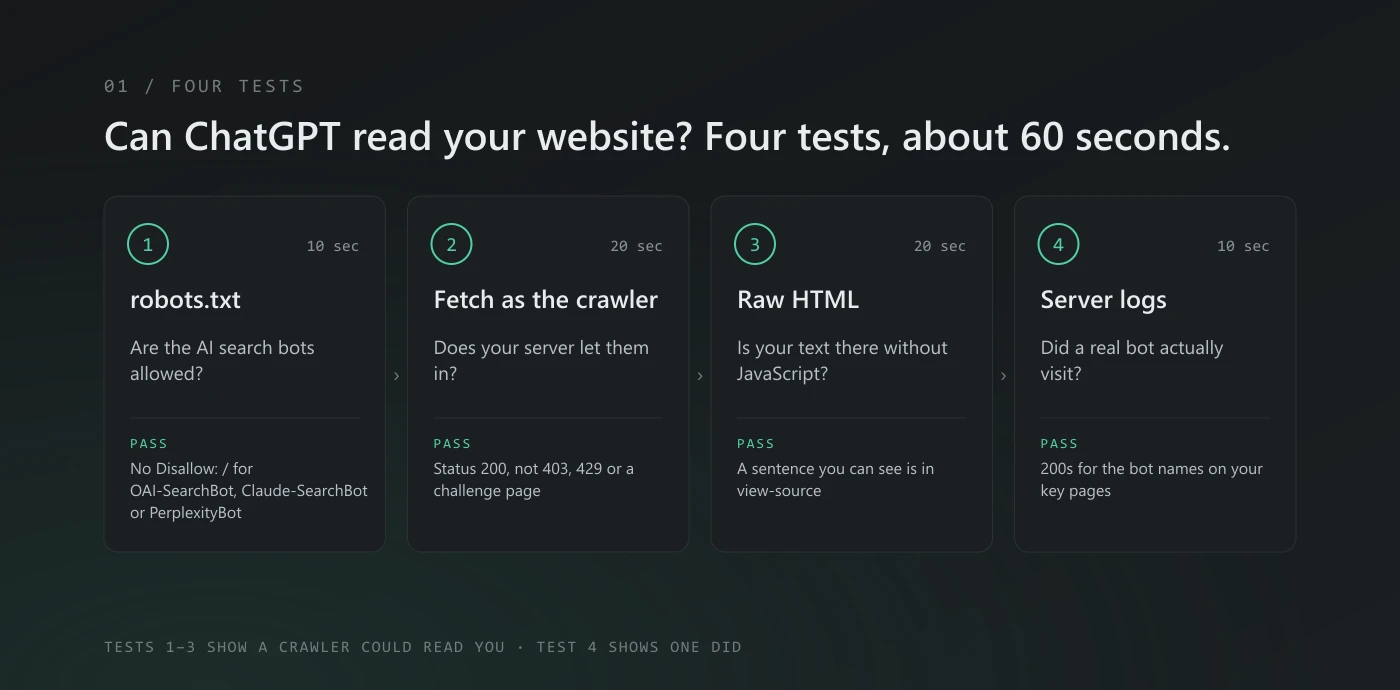
Short answer: ChatGPT can only use your site if its crawlers are allowed in, your server lets them through, and your content is in the HTML they download. You can check all three yourself in about a minute: read your robots.txt, fetch a page the way a crawler would, and look at the raw HTML. The free AI visibility check does the same in one go.
I run these tests on every site before we touch it, including our own. Here is the exact routine, in the order I use it.
First: which "ChatGPT" is visiting?
There isn't one ChatGPT crawler. OpenAI, Anthropic and Perplexity each run separate user agents for separate jobs, and they don't all treat robots.txt the same way. This is what each company says about its own bots, as of 30 September 2026:
| Company | User agent | What it does | Follows robots.txt? |
|---|---|---|---|
| OpenAI | OAI-SearchBot | Finds pages to show in ChatGPT's search answers | Yes. Block it and you won't be shown in ChatGPT search answers |
| OpenAI | ChatGPT-User | Opens a page when someone asks ChatGPT to | Not reliably. OpenAI says that because a user starts these visits, "robots.txt rules may not apply" |
| OpenAI | GPTBot | Collects pages that may be used to train future models | Yes. Blocking it doesn't affect ChatGPT search |
| Anthropic | Claude-SearchBot | Indexes pages for Claude's search answers | Yes |
| Anthropic | Claude-User | Fetches a page when someone asks Claude to | Yes |
| Anthropic | ClaudeBot | Collects pages that may be used for training | Yes |
| Perplexity | PerplexityBot | Surfaces and links pages in Perplexity's answers; not used for training | Yes |
| Perplexity | Perplexity-User | Visits a page to answer a user's question | Generally no. Perplexity says it "generally ignores robots.txt rules" |
Google-Extended | A robots.txt token for Gemini training and grounding, not a separate crawler | Yes. Google says it doesn't affect inclusion or ranking in Google Search |
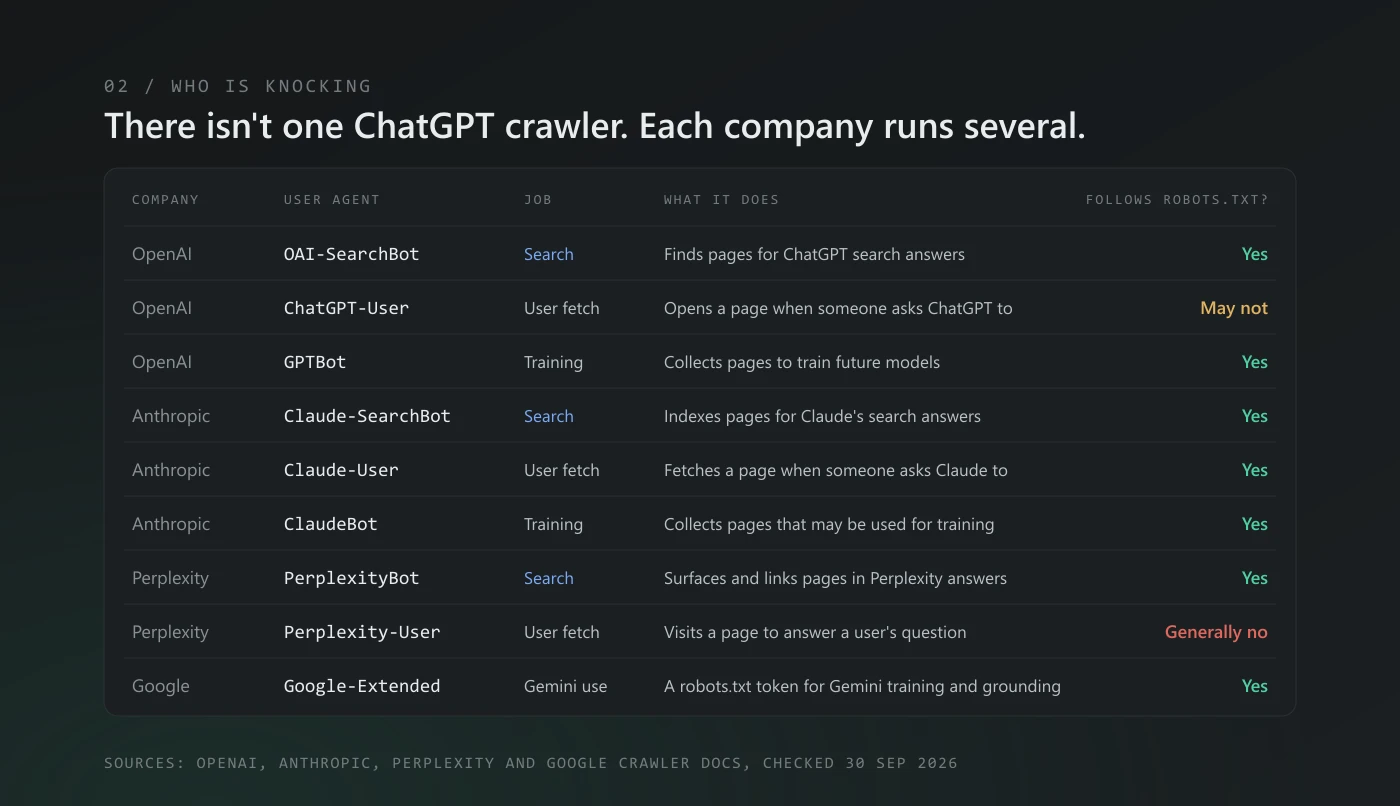
The rule I follow: the search bots (OAI-SearchBot, Claude-SearchBot, PerplexityBot) should always get in. The training bots are a business decision, and it's fine to say no to them. And don't treat robots.txt as a lock: the fetchers that act for a user, ChatGPT-User and Perplexity-User, may read a page you've disallowed anyway.
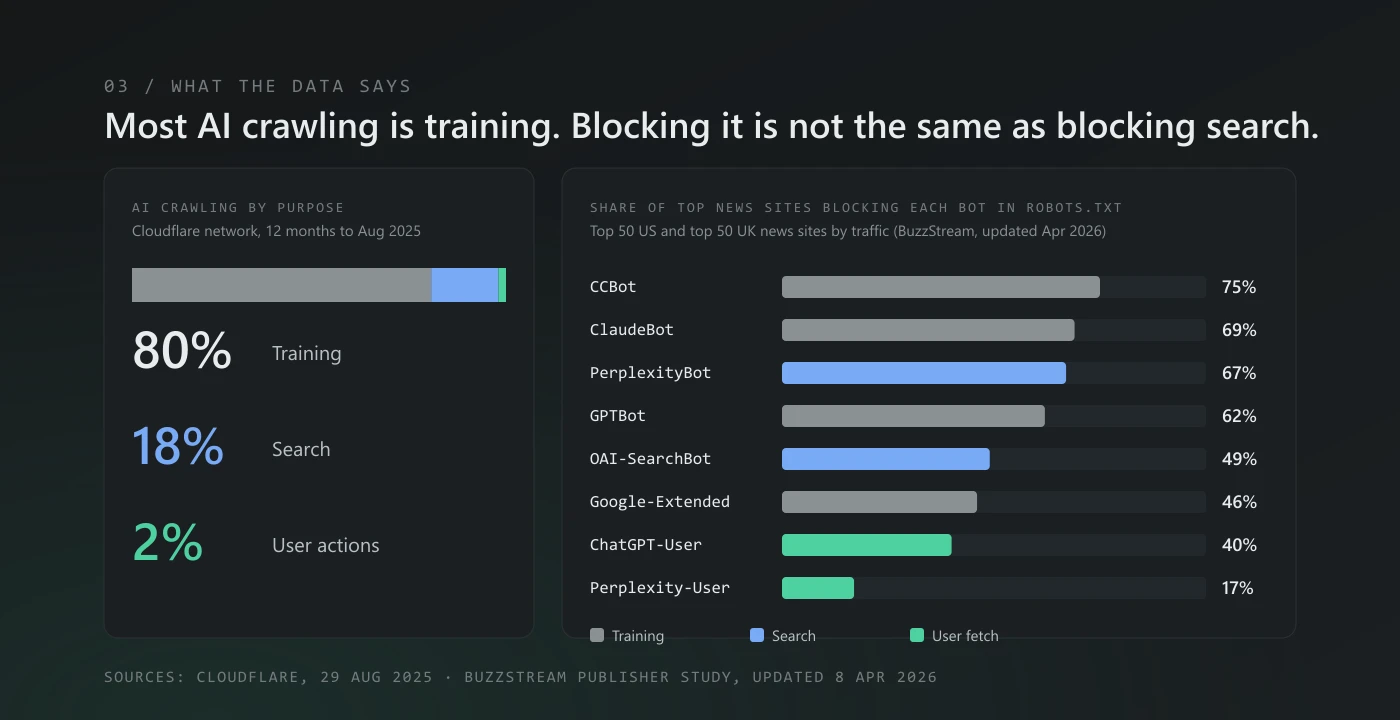
The data shows how easy it is to mix these up. On Cloudflare's network, 80% of AI crawling over the 12 months to August 2025 was for training, 18% for search and 2% for user actions. Yet in a BuzzStream study of the top 50 US and top 50 UK news sites, 49% blocked OAI-SearchBot in robots.txt, the bot that puts them in ChatGPT's search answers, not just the training bot GPTBot (62%).
Test 1: read your robots.txt (10 seconds)
Open https://yourdomain.com/robots.txt in a browser. You're looking for three things:
- A blanket block.
User-agent: *followed byDisallow: /shuts out every crawler that has no group of its own, including the search bots above. - A named block. A group for
OAI-SearchBot,Claude-SearchBotorPerplexityBotwithDisallow: /. Some plugins and "AI blocker" toggles add these without saying so. - No file at all. That's allowed (crawlers treat a missing file as "everything is open"), but you lose the chance to point them at your sitemap.
A healthy file for most businesses looks like this:
User-agent: *
Allow: /
Disallow: /admin/

Sitemap: https://yourdomain.com/sitemap.xml
Our own robots.txt names each AI crawler and allows it deliberately, so there's no doubt about intent.
Test 2: fetch a page as the crawler (20 seconds)
robots.txt is a request, not a gate. The real gate is your server, your CDN and your firewall. Open a terminal and run:
curl -s -o /dev/null -w "%{http_code}\n" -A "OAI-SearchBot/1.0; +https://openai.com/searchbot" https://yourdomain.com/Then the same with PerplexityBot and Claude-SearchBot in place of the user agent. What the number means:
- 200: the page came back. Good.
- 403: something refused it. Usually a firewall or bot-protection rule.
- 429: rate-limited. The crawler will get some pages and miss others.
- 301/302 in a loop, or a challenge page: a "checking your browser" screen. A crawler can't pass that.
One honest caveat: this test sends the crawler's name, not its network address. Firewalls that verify real crawlers by IP may block your test and still let the genuine bot in, or the other way round. A 403 here means "go and look at your firewall rules", not "you're definitely invisible". Test 4 settles it. If you do get a 403, here's how firewalls like Cloudflare block AI bots by accident, and how to fix it.
If you'd rather not open a terminal, the free Crawler Tester fetches your page as GPTBot, ClaudeBot, PerplexityBot and Google-Extended, and shows the status code and the robots.txt rule for each one.
Test 3: look at the raw HTML (20 seconds)
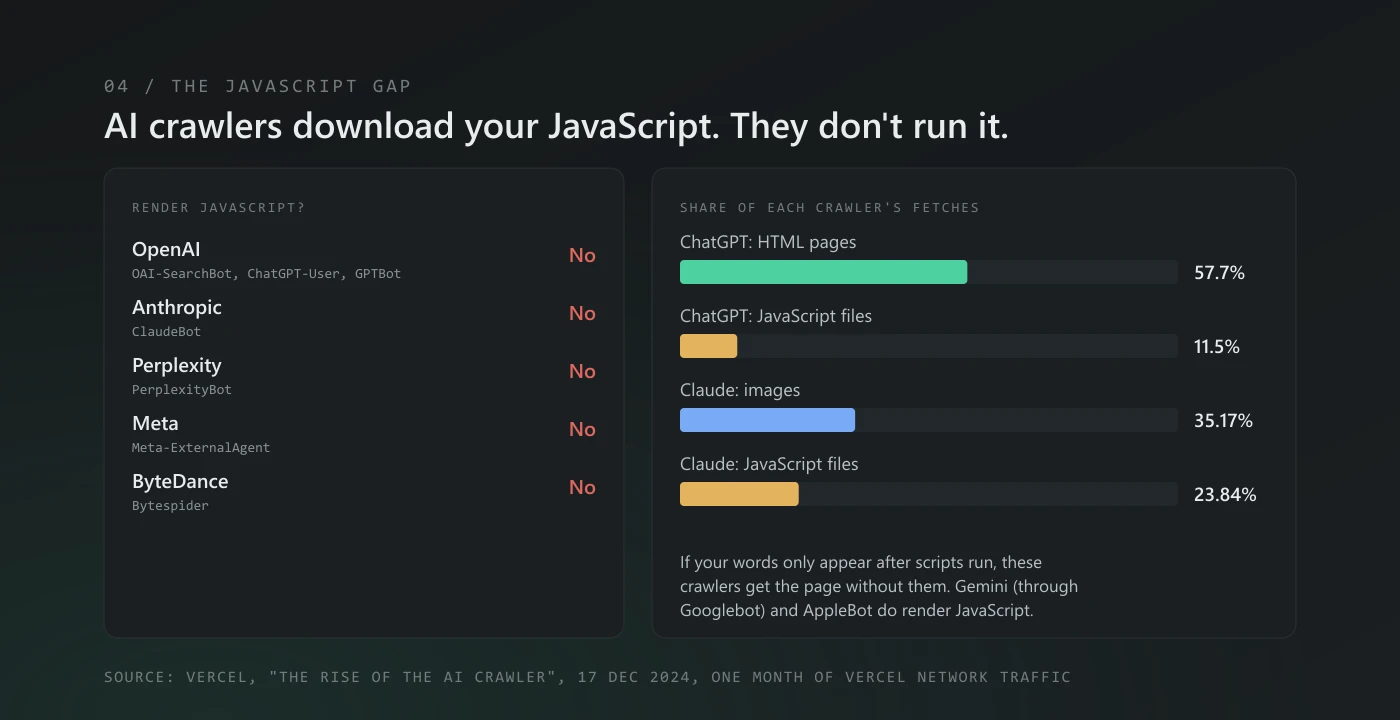
This is the one that catches most modern sites. Crawlers for AI answers download your HTML; they don't run your JavaScript the way a browser does. Vercel looked at a month of AI crawler traffic across its network in late 2024 and found that none of the major AI crawlers render JavaScript, including OpenAI's three bots, ClaudeBot and PerplexityBot. They download the script files (11.5% of ChatGPT's fetches, 23.84% of Claude's) but never run them. If your text only appears after scripts run, the crawler gets an almost empty page.
Check it: open your homepage, press Ctrl+U (Cmd+Option+U on a Mac) to view the source, and press Ctrl+F. Search for a sentence you can see on the page, say your opening line, a price or your phone number.
- Found it: the text is in the HTML. A crawler can read it.
- Not found, but the page looks full in the browser: the content is added by JavaScript. Page builders, single-page apps and some themes do this. It needs server-side rendering or pre-rendering, and it's worth fixing before anything else.
From the terminal the same check is one line:
curl -s -A "OAI-SearchBot" https://yourdomain.com/ | grep -i "a sentence from your page"These first three tests are the AI half of a full crawl audit, which also covers sitemaps, redirects and crawl budget.
Test 4: check your server logs (10 seconds, if you have them)
The first three tests tell you whether a crawler could read you. Logs tell you whether one actually did. If your host gives you access logs, search them for the bot names:
grep -E "OAI-SearchBot|ChatGPT-User|Claude-SearchBot|Claude-User|PerplexityBot|Perplexity-User" access.log | tail -20Look at the status column. A run of 200s on your important pages is what you want. 403s and 429s against a real bot's requests mean your firewall is turning it away, whatever robots.txt says. No visits at all over a few weeks usually means nothing links to you yet, which is a different problem from being blocked.
Once the bots are getting in, the next question is whether you're being shown. How to tell if AI search optimization is working covers the reports that answer that.
What we got on our own site
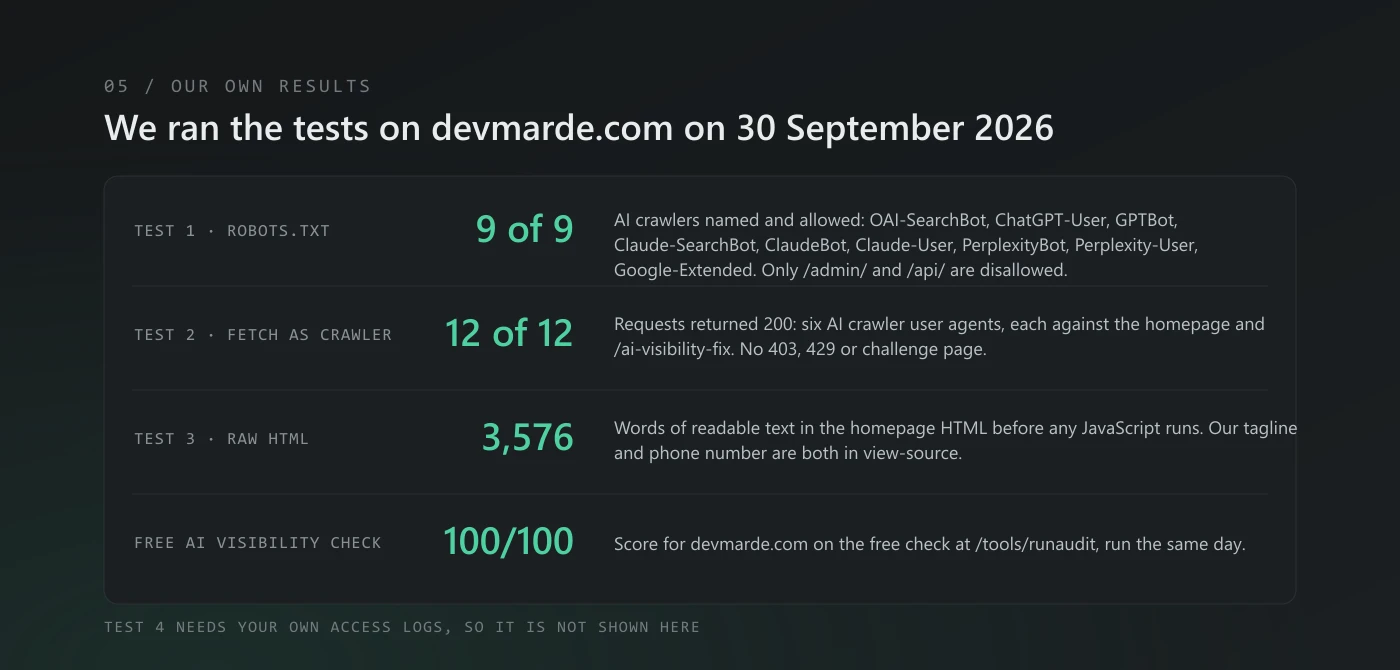
I ran the first three tests and the free check on devmarde.com on 30 September 2026, the day this was published:
- robots.txt: all nine AI crawlers in the table above are named and allowed. Only
/admin/and/api/are disallowed. - Fetch as the crawler: 12 of 12 requests returned 200 (six AI crawler user agents, each against the homepage and one offer page).
- Raw HTML: the homepage serves 3,576 words of readable text before any JavaScript runs, and our tagline and phone number are both in view-source.
- Free AI visibility check: 100 out of 100.
What "readable" actually needs
Passing all four tests means an assistant can read your site. Whether it can say anything useful about you depends on what it finds there:
- Who you are, in structured data. An
OrganizationorLocalBusinessblock with your name, address, phone and links to your real profiles. - Facts, not slogans. "Fixed price, ships in 14 days, UK and US" can be repeated. "Award-winning, world-class solutions" can't.
- Answers in plain HTML. The five or six questions customers ask you on the phone, answered on the page in a sentence or two each.
None of this guarantees an assistant will mention you. It makes sure that when it looks, there's something clear to find.
Being readable is the first step of AI search optimization. The guide covers what comes after it, and our AI visibility service is there if you'd rather hand the whole job over.
The 60-second version
If you only do one thing, run the free AI visibility check. It fetches your site, reads your robots.txt, looks for structured data and answers, and gives you a score out of 100 with a fix for each check that fails. Run it on yours before you change anything, so you have a before score.
If the list is long, or the fix is in your theme or your firewall, that's what our AI Visibility Fix is for: we fix it in two weeks, priced from your Crawl Audit report (up to $490), and your score goes up at least 20 points on the free Crawl Audit check, or the fix is refunded.
Questions people ask
Does ChatGPT read my website in real time?
Partly. For its search answers, ChatGPT relies on pages OAI-SearchBot has already found, and that bot follows robots.txt. When someone asks ChatGPT to open a specific page, it fetches it as ChatGPT-User, and OpenAI says robots.txt rules may not apply to those visits.
Can ChatGPT look at a website if I paste the link?
Yes, when it has web access. ChatGPT opens the page as ChatGPT-User and reads the HTML your server sends back. It sees what Tests 2 and 3 show you: if the server answers with a 403 or a "checking your browser" page, or the text only appears after JavaScript runs, ChatGPT gets little or nothing and may say it can't open the page. Paste your own link into ChatGPT and ask it to quote your opening line. If it can't, start with Test 2.
If I block GPTBot, will ChatGPT stop showing my site?
No. GPTBot collects training data. ChatGPT's search answers use OAI-SearchBot, which you control separately in robots.txt. OpenAI documents the two settings as independent of each other.
Can I stop AI assistants opening my pages with robots.txt?
Not completely. The search and training bots follow it, and so does Anthropic's Claude-User. But OpenAI says robots.txt may not apply to ChatGPT-User, and Perplexity says Perplexity-User generally ignores it, because a person asked for the page. If a page must stay private, put it behind a login.
My site is on Wix, Squarespace or Shopify. Can I still check?
Yes. Tests 1 and 3 work on any site, and the free check works on any public URL. The fixes differ by platform; most let you edit robots.txt and add structured data without a developer.
How often should I re-check?
After any theme change, plugin install, CDN or firewall change, and otherwise once a quarter. Bot-protection settings are the most common thing to change without anyone noticing.
Sources
- OpenAI, Overview of OpenAI crawlers, checked 30 September 2026.
- Anthropic, Anthropic's web crawling bots, checked 30 September 2026.
- Perplexity, Perplexity crawlers, checked 30 September 2026.
- Google, Google's common crawlers (Google-Extended), checked 30 September 2026.
- Cloudflare, The crawl-to-click gap, 29 August 2025.
- BuzzStream, Which news publishers block AI bots, updated 8 April 2026.
- Vercel, The rise of the AI crawler, 17 December 2024.
Zain Kazmi runs DevMarDe, a development, marketing and design studio. We build the free AI visibility tools on this site and use them on our own pages first.
Related
View all →How to tell if AI search optimization is working
Six free ways to measure AI search optimization, in the order to check them: Google and Bing AI reports, ChatGPT referrals, crawler logs and a prompt panel.
Is your firewall blocking ChatGPT? How Cloudflare and WAFs block AI bots by accident
robots.txt can say yes while your firewall says no. How Cloudflare's AI bot controls, bot-fight modes and WAF rules block ChatGPT, Claude and Perplexity search bots by accident, how to spot it, and how to fix it.
Crawl audit checklist, including the AI crawlers
A crawl audit checks that bots can reach, fetch and read every page that matters. The checklist, our own numbers, and the AI-crawler half most audits skip.
Find out whether AI answers can read your site.
Crawl Audit scores your own domain against the signals in this guide. The free check needs no sign-up; the full report is $7.89, one time.